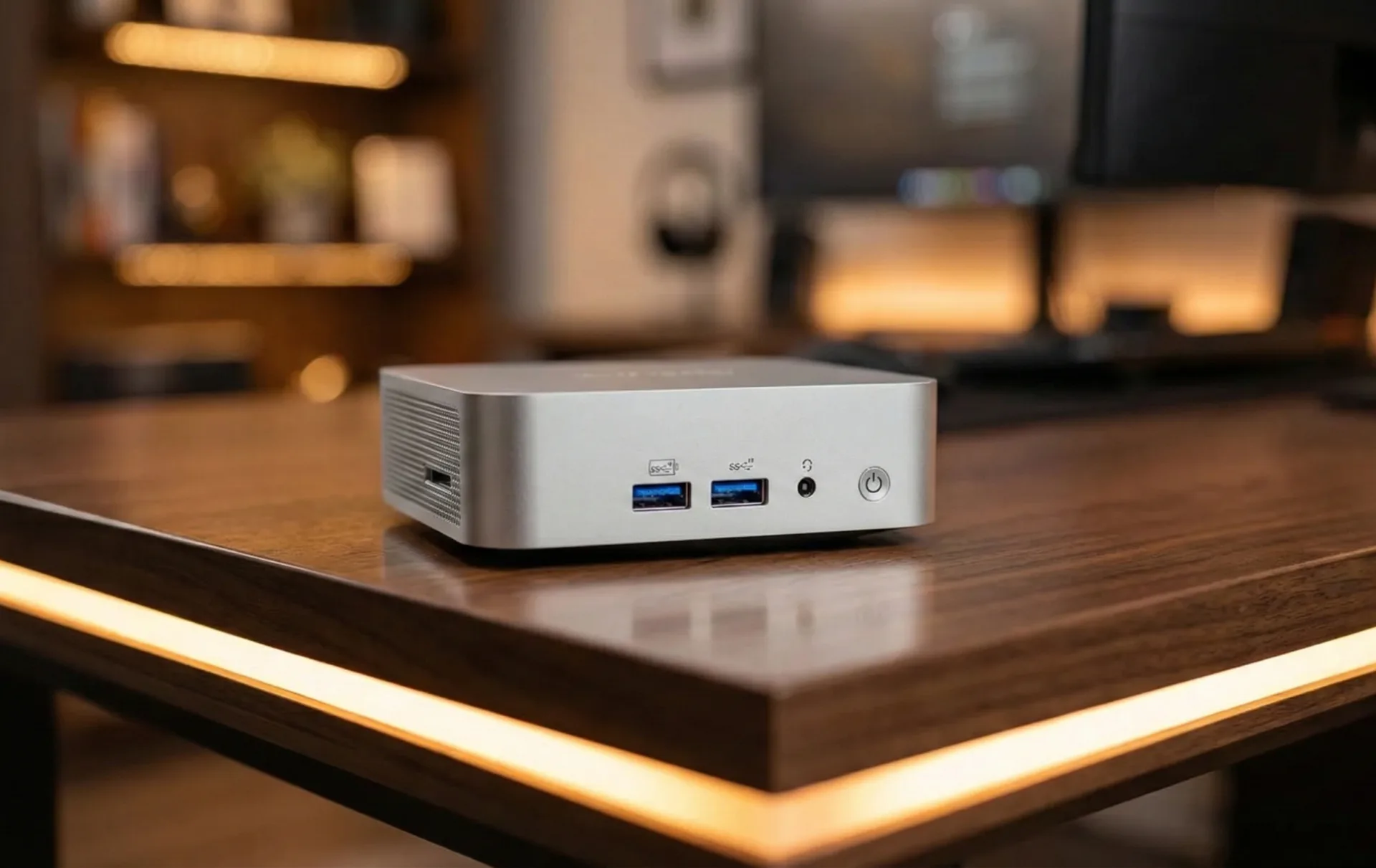
The "homelab" isn't a new phenomenon; it's a personal IT proving ground where enthusiasts and aspiring professionals tinker with servers, networking, and automation. What once demanded repurposed, power-hungry desktop towers or specialized rack-mounted hardware is now being revolutionized by an unlikely hero: the mini PC. These diminutive powerhouses, once relegated to basic desktop duties, are rapidly becoming the pragmatic and powerful backbone for home IT exploration. And in our view, this isn't just a trend; it's a significant shift in how we approach home infrastructure.
But why the sudden spotlight on mini PCs? We believe the answer lies in their compelling combination of performance, efficiency, versatility, and undeniable value. They’re not just competing with, but often decisively outclassing, the ubiquitous Raspberry Pi in many critical homelab scenarios.
Performance: More Punch Than Their Size Suggests
Modern mini PCs are anything but underpowered. Armed with capable processors from Intel (like the Alder Lake N150, N100, or Core Ultra 155H) and AMD (Ryzen 5000, 7000, and even 8000 series mobile processors), these compact systems pack genuine computing muscle. Take the Geekom Air 12 Lite, for example, with its Intel Alder Lake N150. It "performs better than any Raspberry Pi stack, including Pi 5," offering "faster storage with NVMe drives" and "stable gigabit networking." This isn't just marketing speak; it translates directly into a vastly superior user experience for homelabbers. Applications launch faster, data transfers are more responsive, and resource-intensive services like Nextcloud, Jellyfin, or Grafana run smoothly "without load climbing." For demanding tasks such as media streaming, an Intel N100 mini PC proves revelatory, capable of transcoding 2160p HDR video with Jellyfin at an impressive 77 frames per second, theoretically serving five televisions simultaneously.
Just as important, mini PCs support ample RAM – often 16GB, 32GB, or even up to 96GB with DDR5 SO-DIMMs. This memory capacity is vital for virtualization, as even idle virtual machines consume memory, making it a critical differentiator from less capable platforms. As many in the homelab community can attest, memory often becomes the primary bottleneck in virtualized environments before the CPU is fully utilized. Furthermore, the inclusion of fast NVMe SSDs provides superior boot times and read/write speeds, offering greater durability and reliability compared to traditional microSD cards or slower USB storage often found in Pi setups.
The Home Advantage: Efficiency and Practicality Redefined
A homelab, by its very nature, integrates into a living space, often 24/7. This makes factors like size, noise, and power consumption top priorities, and here, mini PCs truly shine.
- Compact Footprint: "Small enough to fit on a shelf, behind a monitor, or next to a router," mini PCs are ideal for spaces with limited room. Many models, such as the ASUS PN50, come with VESA mounts, allowing for discreet placement. This contributes significantly to a high "Partner Acceptance Factor" (PAF) – a subtle, yet critical, advantage in any home environment that we heartily endorse.
- Whisper Quiet Operation: Most mini PCs employ passive or low-noise cooling, ensuring they remain "cool and quiet even under pressure." This stands in sharp contrast to the often-audible fans of older desktop PCs or budget servers, making them perfectly suited for deployment in bedrooms, offices, or living rooms. However, we've observed that some of the higher-end mini PCs, particularly those with powerful HX-series Ryzen CPUs, can become quite loud under full load, challenging the "whisper quiet" claim for all models. Users should definitely check reviews for noise levels if silence is a top priority.
- Power Sippers: The low power draw of mini PCs means they can "run 24/7 without significantly increasing electricity bills." A Geekom Air 12 Lite idles at a mere eight to ten watts, and the Beelink N5095 consumes less than ten watts. Consolidating multiple services onto one beefier mini PC can often lead to lower overall electricity bills compared to running several weaker, less efficient devices. The community frequently highlights the Intel N100 as a particularly power-efficient choice for homelabs.
- Ease of Setup and Management: Mini PCs typically "come complete out of the box," requiring minimal setup beyond potentially adding an SSD and RAM. They utilize standard 12V adapters and common USB peripherals, eliminating the need for specialized power supplies or complex cooling solutions. For ongoing management, they are headless-ready, allowing for SSH or web dashboard access. Tasks like cloning drives or backing up configurations are straightforward, making experimentation and recovery from mistakes far less daunting.
The x86 Advantage: Unlocking True Virtualization and Compatibility
Perhaps the most significant advantage mini PCs hold over ARM-based alternatives like the Raspberry Pi lies in their x86 architecture. This ensures "superior software compatibility for containers and virtualization," resolving common "container software headaches." Docker images run as intended, updates apply cleanly, and dependencies resolve correctly, providing a consistent and reliable environment for software development and deployment. This is a critical point that the homelab community consistently emphasizes: for general-purpose server tasks and learning professional IT skills, x86 simply offers broader and more native software support.
Furthermore, mini PCs support native virtualization (Proxmox, KVM) without emulation or slowdowns, thanks to hardware-assisted virtualization (VT-x or AMD-V). This makes them excellent for running multiple virtual machines or containers simultaneously, allowing users to "experiment with real-world tools" like Docker, Kubernetes, Proxmox, Ubuntu Server, or TrueNAS Scale. They provide a low-stakes way to learn skills applicable to enterprise IT, allowing for the simulation of internal networks, testing of firewalls, and monitoring of traffic without affecting main network equipment. We've seen countless discussions on forums where new homelabbers struggle with ARM's compatibility nuances, making x86 a clear winner for a smooth learning curve.
Beyond the Pi: A More Solid Foundation for Growth
While Raspberry Pi clusters certainly have their niche for lightweight, highly specialized, or educational setups focusing on GPIO, mini PCs offer a more solid and efficient foundation for most homelab scenarios. A single mini PC often delivers "better performance than a cluster of Raspberry Pis," as distributed systems inherently introduce overhead. Moreover, the hidden costs of Raspberry Pi clusters – additional storage, power supplies, cases, and cooling – often make them less cost-effective than a fully integrated mini PC, especially when considering the vibrant second-hand market for mini PCs. It's a point worth scrutinizing: while a bare Pi might seem cheap, accessorizing it for a proper server setup quickly erodes its budget advantage, as multiple community discussions highlight.
Scalability and expandability are also better addressed with mini PCs. Many higher-end models feature 2.5 gigabit Ethernet ports, multiple NVMe slots (like the CWWK N100 mini PC router with 4x 2.5 gigabit Ethernet and 5x NVMe slots), and even 40-gigabit USB4 ports, offering ample connectivity. For bulk storage, mini PCs pair well with multi-bay USB SATA enclosures like the Cenmate 6-bay unit, enabling a common homelab strategy of decoupling compute from storage via NFS or iSCSI.
Navigating the Options: Choosing Your Homelab Heart
The market is currently flooded with excellent mini PC options. When selecting one, consider these key factors:
- CPU: A powerful CPU with at least four cores is essential for virtualization and containerization. Look for newer Intel N100/N150 or AMD Ryzen 5000/7000/8000 series. The Intel N100, in particular, has garnered significant community praise for its balance of performance and efficiency.
- RAM: 16GB is a solid starting point, with 32GB or more recommended for running multiple VMs. DDR4 SO-DIMMs (up to 32GB) offer good value, while DDR5 SO-DIMMs (up to 48GB per slot) provide higher ceilings. We strongly advise prioritizing RAM, as it's often the limiting factor in virtualized setups.
- Storage: A 512GB NVMe SSD or larger is recommended for faster operations. Many mini PCs also include a 2.5-inch SATA slot for additional storage.
- Networking: Multiple 2.5 gigabit Ethernet ports are a valuable upgrade for network performance. Intel network adapters are generally preferred by the community for their robust compatibility with Linux-based hypervisors.
- Thermal Performance: Good cooling design is crucial for long-term high-load operations. While many are quiet, sustained heavy loads can challenge some designs.
Mini PC CPU Value Tiers
Value champions often include systems based on the Intel N100 (e.g., Trigkey N100, Beelink N100) or older Ryzen CPUs like the 5560U and 5700U (e.g., Beelink SER5 series), which offer an excellent "cost-performance ratio." The Intel N100, for instance, delivers significant performance for its price, with a 16GB DDR4 model rivaling a much more expensive laptop in core performance.
For those seeking extreme performance, models like the ACEMAGIC AM08 Pro with AMD Ryzen 8000 series processors or the MINIX EU715H-AI with Intel Core 7 Ultra 155H offer top-tier power for demanding tasks like deep learning or scientific computing.
While mini PCs offer tremendous value, some nuances deserve attention. We've seen that the weakest (N5095) and some of the newest high-end CPUs (e.g., 8845HS/7840HS) can sometimes be the "worst value for performance per dollar." For bulk storage, relying solely on external USB drives or "janky M.2 to SATA solutions" can be less reliable than dedicated NAS units or servers with direct drive connections. Community feedback consistently points out that while mini PCs are great for compute, large-scale, redundant storage is better handled by purpose-built NAS devices. Thermal performance, much like laptops, also requires consideration under sustained heavy loads.
The Future of the Homelab is Compact
As of early 2026, mini PCs have solidified their position as an unparalleled solution for homelabs. They offer a potent mix of "power, flexibility, and affordability," making them a practical and approachable entry point for anyone eager to explore the world of servers, containers, networking, and automation. They simplify lab setups, reduce clutter and power consumption, and provide a reliable, compatible platform for learning and innovation. For the modern homelabber, the miniature form factor represents not a compromise, but a powerful and efficient launchpad for countless digital adventures.




Comments