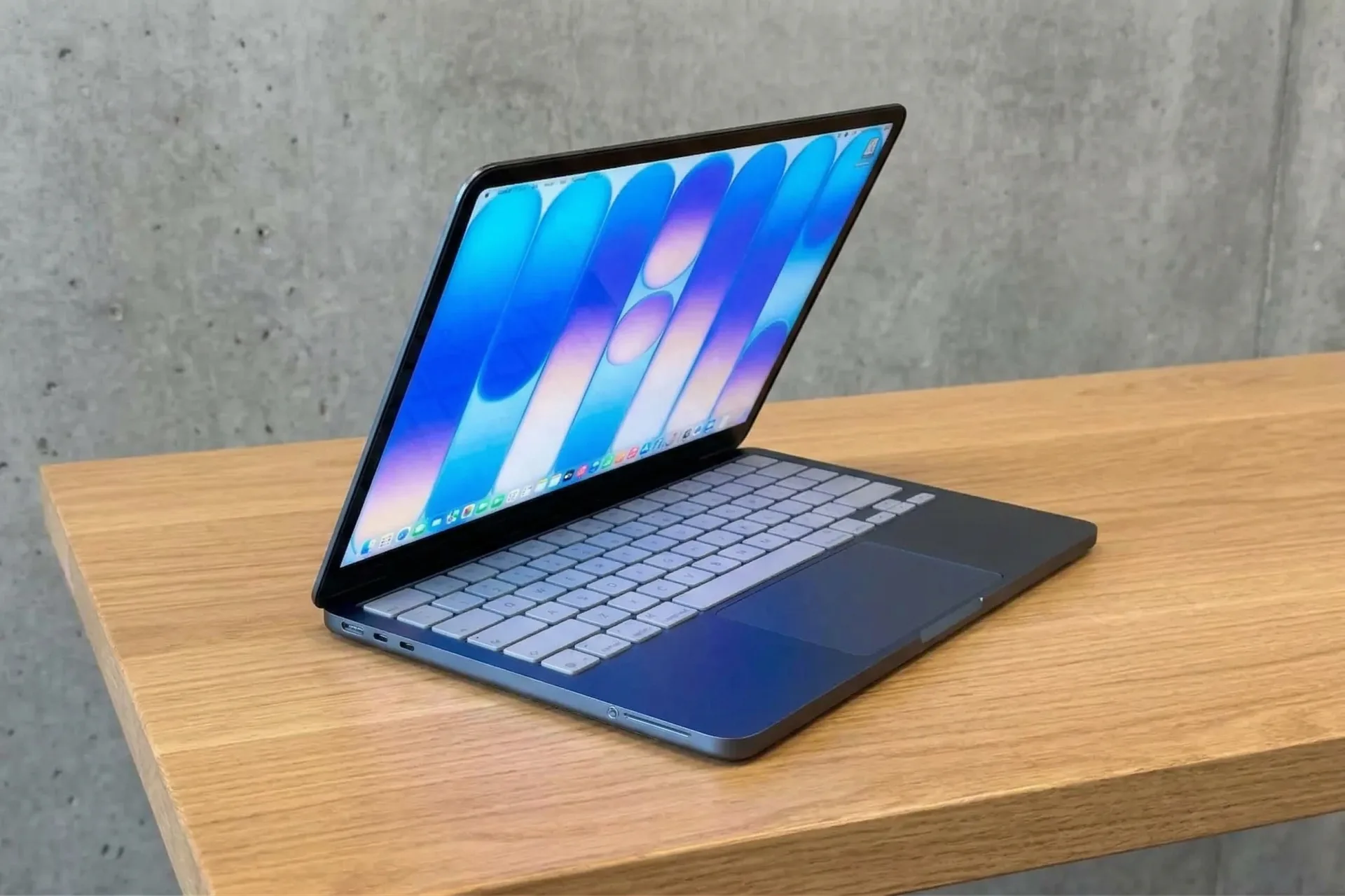
The $599 MacBook Neo is the most affordable laptop Apple has ever released, but it arrives with a list of caveats that would make even a budget Chromebook blush. Announced on March 4, 2026, with general release beginning on March 11, 2026, this machine is clearly designed to replace the aging M1 MacBook Air as the default choice for students and casual users.
By repurposing the A18 Pro chip from the iPhone 16 Pro, Apple has created a device that feels snappy in bursts but struggles under the weight of modern multitasking. We spent the last two weeks testing the Neo to see if the low entry price justifies the heavy compromises in hardware.
A Premium Shell with Budget Soul
At first glance, the MacBook Neo doesn’t look like a budget machine. The all-aluminum chassis weighs just 2.7 lbs and feels every bit as sturdy as a MacBook Air. Apple offers it in four colors, though the "Citrus" model we tested is a bit of a chameleon; depending on the light, it shifts from a lime green to a dull gold.
To hit that $599 price point ($499 with a student ID), Apple cut corners aggressively. The Apple logo on the lid is debossed aluminum rather than the polished steel found on the Pro models. Inside, the keyboard is color-matched to the chassis, but it lacks any form of backlighting. Shipping a laptop in 2026 without a backlit keyboard is a baffling decision that makes evening study sessions or late-night emails unnecessarily difficult.
The typing experience itself has drawn mixed reactions from our team. Compared to the crisp, tactile feel of the MacBook Air, the Neo keys feel spongy and thin. The trackpad is another point of contention. Instead of the haptic Force Touch tech Apple is known for, this is a mechanical trackpad. While it supports clicking anywhere on the surface, it produces a loud, clunky sound that feels more like a budget Windows laptop from five years ago than a modern Mac.
iPhone Silicon Meets macOS Tahoe
The Neo is the first Mac to move away from the M-series chips, opting instead for the A18 Pro. On paper, it’s a powerhouse for a mobile chip, but inside a laptop running macOS Tahoe, the results are mixed.
In single-core tasks, the A18 Pro beats the original M1 chip, making web browsing and word processing feel instantaneous. However, the 6-core CPU falls behind in multi-core performance. This isn't helped by the 8GB of unified memory, which remains non-upgradable. If you keep thirty Chrome tabs open while streaming music and editing a photo, you will hit a wall.
The SSD speeds are also much slower than what you’ll find in the MacBook Air, topping out at around 1700 MB/s. This results in longer wait times for app launches and file transfers.
The Display and the Port Tax
The 13.0-inch Liquid Retina display is bright and sharp enough for Netflix, but it lacks the P3 wide color and True Tone technology found on every other Mac. To most users, this won't matter, but if you do any hobbyist photo editing, the colors won't be as accurate as you'd like.
The connectivity, however, is the most frustrating part of the Neo experience. You get two USB-C ports, but only one of them supports high-speed data. The other is limited to USB 2.0 speeds (480 Mbps). Apple included software alerts in macOS Tahoe to warn you if you’ve plugged a fast drive into the slow port. In an era where 10Gbps is the standard, 480 Mbps feels like a technical insult.
Furthermore, there is no MagSafe. You must use one of those two USB-C ports for charging, and the included 20W power adapter is painfully slow. We found it takes far longer to top up the Neo compared to an Air with a 30W or 35W brick.
The $100 Tax on Basic Features
Apple’s $599 marketing is effective, but the base model is a trap. If you want Touch ID—a feature that has been standard on Macs for years—you have to pay an extra $100 to upgrade to the 512GB storage model. At $699, the Neo looks less like a bargain and more like an overpriced iPad with a permanent keyboard.
MacBook Neo vs. MacBook Air (M1/M2/M3)
The Choice Between Value and Frustration
The MacBook Neo is a complicated machine. It provides a way into the Apple ecosystem for a price we haven't seen before, and for many parents buying a first laptop for a middle-schooler, that $599 sticker price will be the only factor that matters. The 1080p webcam and 16-hour battery life for video are genuine highlights that beat out many Windows competitors in this price range.
However, for anyone else, the trade-offs are steep. The lack of a backlit keyboard, the clunky mechanical trackpad, and the forced $100 upgrade for Touch ID make this feel like a device designed to annoy you into spending more. We recommend it only if your budget is strictly under $600. If you can find a refurbished MacBook Air for the same price, buy the Air—it remains the better computer in every way that counts.
Final Recommendation: Buy it for a student or a grandparent who only needs a browser. Everyone else should save an extra $200 for an Air.





Comments