RigBoard
Your rig. Your news. Your dashboard.
A self-hosted personal dashboard for PC gaming enthusiasts, hardware tinkerers, and homelabbers. One Docker container, no cloud dependencies, your data stays on your machine.
$ git clone https://github.com/Ttek2/rigboard.git
$ cd rigboard
$ docker compose up -d
✓ RigBoard is running at http://localhost:3000
See It In Action
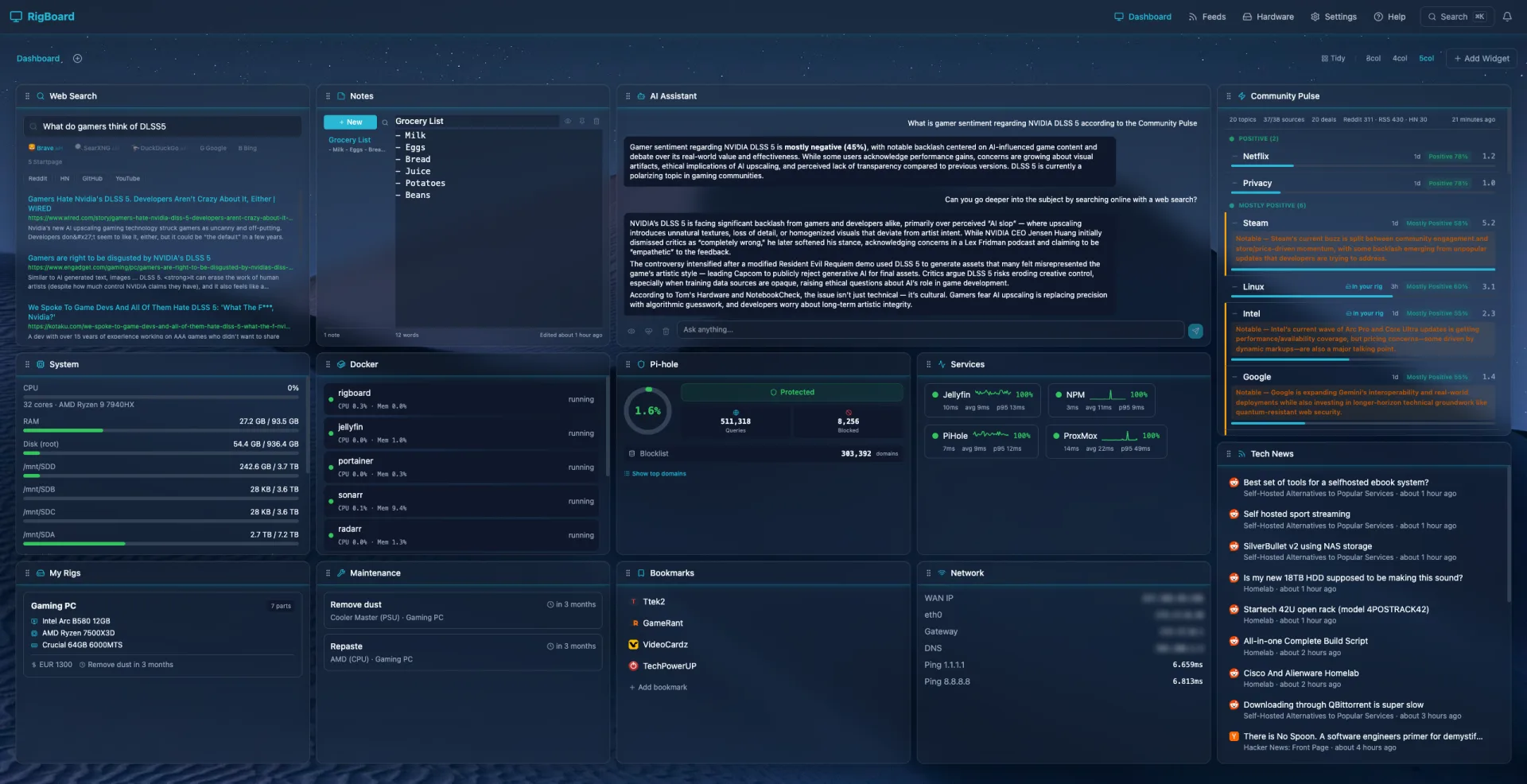
Screenshot coming soon
Everything You Need
29 widget types, homelab integrations, AI assistant, Telegram bot, and more — all in a single container.
Dashboard
29 widget types with drag-and-drop grid layout, smart masonry packing with auto-arrange, multiple dashboard tabs with configurable column layouts, 14 color themes, 10 visual styles, custom wallpapers, and global search (Cmd+K) with command palette. Installable as a PWA.
Community Pulse
Real-time trending tech intelligence from 39+ sources including Reddit, Hacker News, and Google Trends. AI-powered sentiment analysis and hardware-match detection.
AI Assistant (optional)
Completely optional — RigBoard works great without it. If you want it, it supports any OpenAI-compatible endpoint (OpenAI, Ollama, LM Studio, Groq) with 12 executable actions, 3 autonomy levels, web search, AI heartbeat monitoring, persistent memory across sessions, and a Telegram bot for two-way AI chat and push notifications from your phone.
Hardware Tracking
Document your PC builds with nested component hierarchies, warranty and price tracking, maintenance logging with recurring schedules and webhook alerts, CSV/JSON bulk import, rig timeline view, component photo gallery, and shareable public build links.
Content
RSS/Atom feed reader with OPML import/export, inline article reader, feed starring, web search widget with inline results (DuckDuckGo, Brave, SearXNG), markdown notes with live preview, bookmarks with favicons, sticky notes, clock/timezone widget, and YouTube subscription tracking via RSS.
Homelab Integrations
Docker, Plex, Jellyfin, Jellyseerr/Overseerr, Sonarr, Radarr, qBittorrent/Transmission, Pi-hole (v5 & v6), Home Assistant, GitHub Releases, service health monitoring with uptime history and heatmaps, GPU monitoring (NVIDIA/AMD/Intel), speed test with history, and incoming webhooks (Uptime Kuma, Grafana, GitHub) — all built in.
Ttek2 Community
Connect your RigBoard to Ttek2 to unlock community features — entirely opt-in, RigBoard works fully standalone without it.
- Comment on articles directly from your dashboard
- Discuss trending topics with the community
- Show your rig badge — let others see what you're running
Toggle it on in RigBoard settings whenever you're ready. No account needed — your RigBoard instance is your identity.
Privacy: When enabled, only your display name, rig badge (e.g. “RTX 4090”), and comments you post are shared with the ttek2.com community. No other data leaves your RigBoard instance. Ttek2 stores zero user data — all accounts and content are managed by your RigBoard server. You can disconnect at any time by toggling this off.
Your community.
Your choice.
Get Started in 30 Seconds
Already have Docker? Three commands and you're done.
git clone https://github.com/Ttek2/rigboard.git
cd rigboard
docker compose up -d
Then open http://localhost:3000 in your browser. That's it.
New to Docker?
Docker packages apps into isolated containers. Here's how to get it on your system.
Download Docker Desktop
Go to docker.com/products/docker-desktop and download the Windows installer.
Run the Installer
Follow the prompts. When asked, enable WSL 2 (Windows Subsystem for Linux) — this is the recommended backend.
Restart Your Computer
Restart when prompted. After reboot, open Docker Desktop from your Start menu — you should see a green "running" indicator in the system tray.
Verify Installation
Open PowerShell or Command Prompt and run:
docker --versionYou should see something like Docker version 27.x.x. You're good to go!
# Update your package index
sudo apt update

# Install Docker
sudo apt install -y docker.io docker-compose-v2

# Add your user to the docker group (no sudo needed next time)
sudo usermod -aG docker $USER

# Log out and back in, then verify:
docker --versionsudo dnf install -y docker docker-compose
sudo systemctl enable --now docker
sudo usermod -aG docker $USER
# Log out and back in, then verify:
docker --versionsudo pacman -S docker docker-compose
sudo systemctl enable --now docker
sudo usermod -aG docker $USER
# Log out and back in, then verify:
docker --versionOnce Docker is installed, head to Quick Start to get RigBoard running.
Choose Your Setup
Three Docker Compose profiles — pick the one that matches how you use your machine.
Minimal
For gamers and casual users. News feeds, hardware tracking, AI assistant, YouTube, Community Pulse, bookmarks, notes, and all third-party integrations. No host access at all.
Standard
Adds read-only host monitoring: CPU, RAM, swap, load, uptime, and GPU stats. No elevated privileges — just read-only mounts. Recommended for most users.
Homelab / Power User
Docker container management, host process listing, full disk detection, and real network info. For homelabbers who want full control from the dashboard.
Secure by Default
Optional password auth with TOTP 2FA and first-run security prompt. Security health dashboard, version checker, automatic daily backups with 7-day retention. Notification center for maintenance, service, warranty, and AI alerts. Prometheus metrics endpoint, incoming webhooks with HMAC verification, config export/import, and in-app help & knowledge base.
MIT License
Completely free and open-source. Use it, modify it, share it. No strings attached.
Community Built
Contributions welcome. Report bugs, suggest features, or submit pull requests on GitHub.
Ready to Build Your Dashboard?
Join the community of PC gaming enthusiasts, hardware tinkerers, and homelabbers running RigBoard.
Get RigBoard on GitHub